
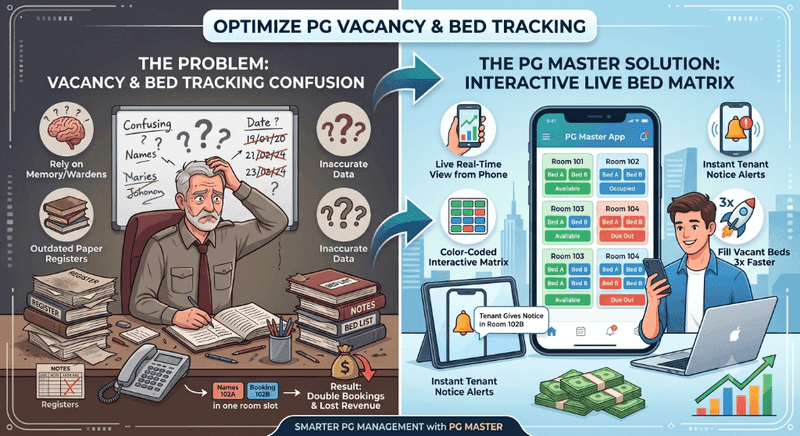
Quick answer: A bed matrix is a visual grid of every bed in your PG, coloured by status (for example green for vacant, red for occupied, yellow for notice period). It shows availability in seconds, prevents double bookings, helps you market beds before they empty and makes room changes easy. It replaces scanning spreadsheet rows or calling the manager.
Imagine a prospective tenant calls at 9 PM and asks, "Do you have a bed in a double-sharing room?" If you must open a spreadsheet, scroll to the right sheet, check notes and call the manager to confirm, you may lose the lead. If you can open one screen and see exactly which beds are free, you answer in ten seconds and book a visit.
That one screen is the bed matrix.
What a bed matrix shows
A bed matrix lists your property by floor, room and bed. Each bed has a status colour, and a tap shows details.
| Colour (example) | Meaning | What you do |
|---|---|---|
| Green | Vacant | Market it, show it, book it |
| Red | Occupied | Nothing, unless issues arise |
| Yellow | On notice | Start marketing before it empties |
| Grey (optional) | Not available | Under repair or reserved |
Good matrices also let you filter by sharing type (single, double, triple), floor, price and availability date.
Why room-level tracking is not enough
Many PGs track rooms, not beds. A "double room" with one tenant is marked "occupied," even though one bed is free. Or a triple room is listed as vacant when two beds are already booked. Bed-level tracking solves this and gives accurate counts for your occupancy rate. See how to calculate PG occupancy rate.
Seven problems a bed matrix solves
1. Double booking
Two staff members promise the same bed to two different people. With a live matrix, once a bed is booked, it changes colour for everyone.
2. Slow answers to enquiries
Seekers contact several PGs and usually go with the first useful reply. A matrix lets you answer instantly with the exact bed, floor and price.
3. Late notice of vacancies
A tenant tells the warden on the 5th that they will leave on the 30th. If it is not visible to you, marketing starts late. A notice-period colour shows the coming vacancy and the date.
4. Confusing room changes
Tenants ask to shift rooms. The matrix lets you see options and move them in a tap, while keeping their payment history and deposit linked.
5. Wrong pricing decisions
When you can see which sharing types are full and which are empty, you know where demand is strong. Use it with our guide on how to set rent per bed.
6. Inaccurate reporting
Without a matrix, occupancy is an estimate. With it, occupancy is a count.
7. Dependence on one person's memory
If the manager is on leave, the owner or a replacement can still see the full picture.
How to use a bed matrix daily
A simple routine takes five minutes:
- Morning check. How many green beds, and which sharing types?
- Notice review. List yellow beds and their last day. Start showing those beds 10 to 15 days earlier.
- Match enquiries. Compare new enquiries with available beds and book visits.
- Update status. Mark moved-in, moved-out and shifted tenants the same day.
- Weekly look-ahead. Count beds that will be vacant in the next 15 and 30 days.
This habit is the foundation of keeping vacancy low. Read how to fill empty beds in 30 days for the full plan.
What to look for in a bed matrix
If you are choosing software, test these points:
- Bed-level, not just room-level. Each bed has its own status and tenant.
- Live updates. Changes show for all users immediately.
- Notice-period status. Beds on notice are visible with dates.
- Filters. By floor, sharing type, price and availability.
- Easy shifting. One or two taps to move a tenant, with history kept.
- Mobile friendly. Usable on a phone, not just a desktop.
- Permissions. Managers can update, but only authorised users change prices or settings.
- Multi-property support. Switch between buildings if you have more than one.
Our software buyer's checklist covers the other features to compare.
Setting up your matrix: a practical guide
Whether you use software or a first version in a spreadsheet, start with the same structure.
- List every bed with a unique code, for example floor-room-bed such as 2-204-B.
- Record the sharing type and monthly rent for each bed.
- Add the current tenant, joining date, rent due date and notice date.
- Mark special cases: out of service, reserved, staff bed.
- Fix a rule for when a bed becomes "vacant" (for example, on the day after the tenant's last day and key return).
- Assign one person to update status the same day anything changes.
Accuracy matters more than design. A wrong matrix is worse than none, because people trust it.
Bed matrix in PG Master
The PG Master Owner App includes a colour-coded live bed matrix with vacant, occupied and notice-period beds, filters by sharing type and one-tap bed shifting. Tenant history, deposits and payments stay linked when you move someone. You can read more on the live bed vacancy matrix, live bed occupancy tracking and room shifting history tracking.
Common mistakes
- Updating the matrix only at month-end.
- Letting several people edit without rules.
- Counting a bed as vacant before the tenant has left or returned the key.
- Ignoring notice periods.
- Forgetting to mark beds as "out of service."
- Not linking beds to prices.
Measuring the benefit
To see whether a bed matrix is working, track:
- average days a bed stays empty between tenants
- time to answer a new enquiry
- number of double bookings or mix-ups
- beds on notice that were already marketed before move-out
If these improve over two or three months, the matrix is paying for itself. Our post on the cost of an empty bed shows how to value each day saved.
Frequently asked questions
What is a bed matrix in a PG? It is a visual grid showing every bed in your property with its status, such as vacant, occupied or on notice.
Is a bed matrix the same as a room chart? No. A room chart shows rooms, while a bed matrix shows each bed, which is essential when rooms have two, three or four beds.
Can I make a bed matrix in Excel? Yes, with a grid and colour formatting. It works for small PGs, but it will not update itself or show live changes to several users.
How does a bed matrix prevent double booking? When a bed is booked or occupied, its status changes immediately for everyone using the system, so it cannot be offered twice.
Does a bed matrix help with multiple properties? Yes. A good system lets you switch between buildings or see all vacancy in one view.
See your beds at a glance
Try the live bed matrix in the PG Master Owner App, or book a demo and ask to see it with your own rooms.
Stop Chasing Rent & Juggling Spreadsheets
ApnaRent helps 170+ owners send automated WhatsApp rent reminders, track live bed vacancy, collect digital KYC, and reconcile expenses in real time.

More from ApnaRent
View all articles Starting a PG
PG vs Hostel vs Co-Living: Which Model Should You Run?
ApnaRent · 6 Jan 2027 · 7 min
 Finance and Profit
PG Owner KPIs: 10 Metrics to Track to Grow Profit
ApnaRent · 5 Jan 2027 · 7 min
 Finance and Profit
PG Owner's Monthly Closing Checklist: Rent, Expenses and Reports
ApnaRent · 2 Jan 2027 · 7 min